Best Podcast Microphones 2026
Your microphone is the single most important piece of podcast equipment. Listeners will tolerate average video, basic editing, and simple intros — but bad audio makes people hit "skip" within seconds. The good news: you don't need to spend a fortune. Even budget USB mics today produce audio that would have required hundreds of dollars in XLR gear just a few years ago.
We've selected five podcast mics across every budget — from complete starter kits under $50 to versatile hybrid setups that grow with your show.
Our Top 5 Picks

1. MAONO PD200W
The MAONO PD200W is the most versatile podcast microphone you can buy under $100. It connects three ways — 2.4GHz wireless, USB-C, and XLR — meaning you can start with simple USB recording today and upgrade to a professional XLR interface setup later, all without buying a new mic.
The 30mm dynamic capsule with cardioid pickup produces warm, broadcast-quality vocals while naturally rejecting background noise. An 82dB signal-to-noise ratio keeps your voice clean, and 128dB max SPL handles even the loudest speakers without distortion. Three-stage noise cancellation in the Maono Link software provides additional cleanup for imperfect rooms.
For duo podcasts, the PD200W's killer feature is dual-mic wireless: connect two PD200W units to one receiver, each recording to its own audio track. No mixer required. The 60-hour wireless battery means you'll charge this mic maybe once a month, and the on-mic gain knob, mute button, and headphone output give you full control without touching software.
The customizable RGB ring adds visual personality for video podcasts. At this price point, nothing else on the market offers this combination of sound quality, connectivity options, and features.
What We Like
- Triple connectivity: wireless + USB + XLR
- Dual-mic wireless for interview podcasts
- 60-hour battery life
- Dynamic — rejects background noise
- On-mic controls with headphone monitoring
- Under $100 — incredible value
What Could Be Better
- Bulky for portable field recording
- EQ may need adjustment in software
- RGB ring not everyone's style
- No Bluetooth — wireless via dongle only
Who it's for: Solo and duo podcasters who want maximum flexibility. Start with USB today, go wireless or XLR tomorrow — one mic that grows with your show.
▶ Watch Video Check Price on Amazon →
2. MAONO PD200XS
The PD200XS is MAONO's dedicated streaming and podcasting workhorse — a dynamic XLR/USB mic bundled with a boom arm, giving you a complete, professional-looking setup out of the box. If you want the broadcast sound and noise rejection of a dynamic mic with zero additional purchases needed, this is the kit to get.
The dual XLR and USB connectivity means you can plug in via USB-C for immediate recording or connect via XLR to an audio interface when you're ready to level up. On-mic controls include a gain knob, mute button, and volume control — essential for live streaming where you need instant access without alt-tabbing to software. The RGB lighting adds a visual element for on-camera streams.
Maono Link software provides full EQ customization, noise gate, compressor, and gain control. The included boom arm clamps to any desk, positions the mic perfectly at mouth level, and keeps your workspace clean. For podcasters and streamers who want one purchase to cover everything, the PD200XS delivers.
What We Like
- Complete kit with boom arm included
- Dual USB + XLR connectivity
- On-mic mute, gain, and volume
- Dynamic — great noise rejection
- Maono Link software for EQ and effects
- Professional on-camera look
What Could Be Better
- No wireless option (wired only)
- RGB may not suit all aesthetics
- Boom arm needs desk edge for clamping
- No dual-mic recording like PD200W
Who it's for: Streamers and podcasters who want a professional dynamic mic setup with everything in the box. Plug in and start creating immediately.
▶ Watch Video Check Price on Amazon →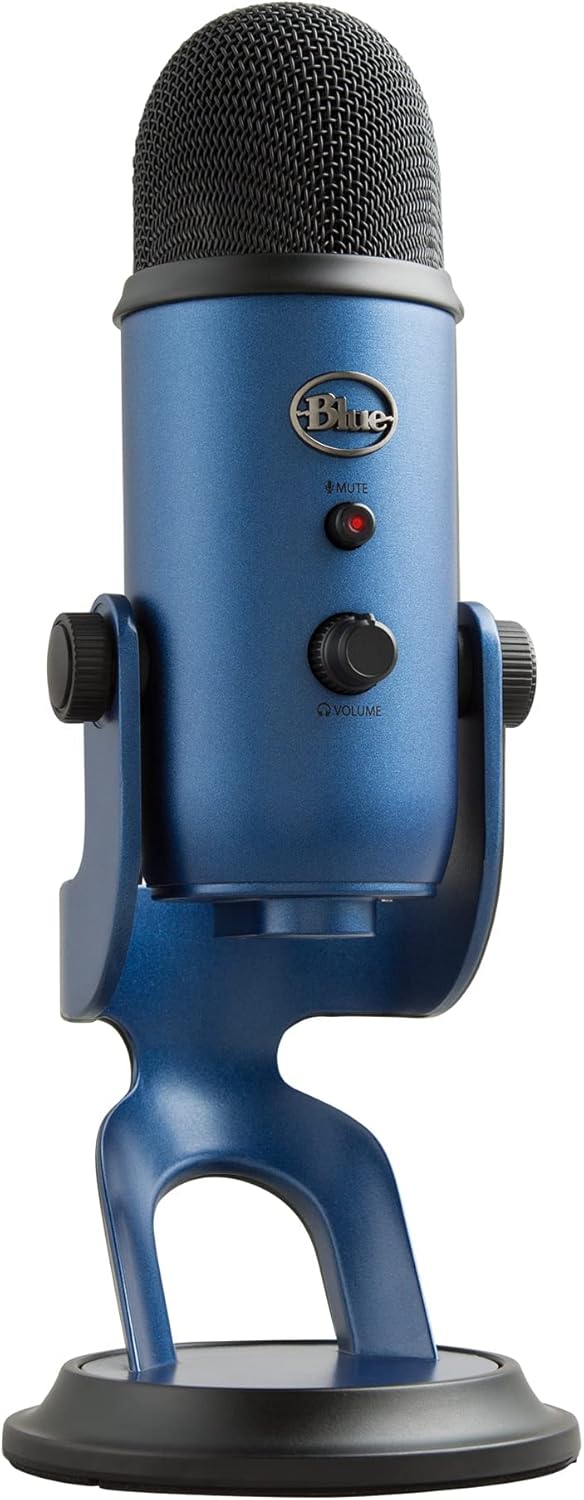
3. Blue Yeti
The Blue Yeti has been the default recommendation for USB microphones for over a decade, and for good reason — it's the only USB mic at this price with four selectable pickup patterns: cardioid, stereo, omnidirectional, and bidirectional. That means one mic handles solo podcasting (cardioid), face-to-face interviews (bidirectional), roundtable discussions (omni), and music recording (stereo).
The three condenser capsules produce rich, detailed audio with excellent vocal clarity. On-mic controls include a gain knob, instant mute button, headphone volume, and the pattern selector. The built-in headphone jack provides zero-latency monitoring. Plug-and-play via USB — works on PC and Mac with no drivers.
The Yeti is larger and heavier than most USB mics, which provides excellent vibration isolation on its included desk stand but also takes up more desk space. For video podcasters, the sizeable body is actually a visual plus — the Yeti is one of the most recognizable mics in content creation, and it looks authoritative on camera.
If you need one mic that does everything well and might use different recording scenarios, the Yeti's four patterns give it flexibility that no single-pattern mic can match.
What We Like
- 4 pickup patterns — unmatched versatility
- Rich, detailed condenser sound
- On-mic gain, mute, volume, pattern
- Zero-latency headphone monitoring
- Iconic design — looks great on camera
- Heavy stand provides stability
What Could Be Better
- Condenser — picks up background noise
- Large and heavy — not portable
- USB-A only (no USB-C)
- No XLR option
Who it's for: Podcasters who need one mic for multiple scenarios — solo episodes, interviews, roundtables, and music. The Swiss Army knife of USB mics.
▶ Watch Video Check Price on Amazon →
4. Blue Yeti Nano
The Blue Yeti Nano takes the legendary Yeti sound and shrinks it into a body that's roughly half the size. If you love the idea of the Yeti but your desk space (or travel bag) can't accommodate it, the Nano is the answer.
It offers two pickup patterns — cardioid for solo work and omnidirectional for group conversations — covering the most common podcasting scenarios. The condenser capsule delivers the same clear, detailed Blue sound, and the on-mic mute button with LED indicator provides instant visual feedback during recordings.
A built-in headphone jack with zero-latency monitoring lets you hear yourself in real time. Connection is USB-C (with a USB-C to USB-A cable included), making it compatible with modern laptops and desktops. Plug-and-play on PC and Mac — no drivers, no software.
The trade-off for the smaller size is losing the stereo and bidirectional patterns, the gain knob (gain is adjusted in software), and some low-end bass response. But for solo podcasting and basic interviews, the Nano sounds excellent and takes up far less space.
What We Like
- Compact — half the size of the Yeti
- Blue's legendary audio quality
- USB-C — modern connectivity
- 2 patterns: cardioid + omni
- Zero-latency headphone monitoring
- 24-bit recording (better than standard Yeti)
What Could Be Better
- Only 2 patterns (vs Yeti's 4)
- No on-mic gain knob
- Condenser — picks up background noise
- No XLR option
Who it's for: Podcasters who want Blue Yeti quality in a smaller package. Perfect for tight desk setups, portable recording, and creators who only need cardioid and omni patterns.
▶ Watch Video Check Price on Amazon →
5. MAONO AU-A04H
Starting a podcast from scratch and need everything? The MAONO AU-A04H is the most complete starter kit on the market — it includes a 192kHz/24-bit USB condenser microphone and a pair of studio monitor headphones in one box, at a price that's hard to believe.
The mic is the well-regarded AU-A04 condenser with a cardioid pickup pattern, metal construction, and plug-and-play USB connectivity. It captures voice with clarity and detail that far exceeds built-in laptop mics. The kit adds a tripod desk stand, pop filter, and foam windscreen — everything you need for a clean recording setup.
The included studio headphones provide accurate audio monitoring so you can hear exactly how your voice sounds to listeners. This is important — monitoring with earbuds or speakers doesn't give you the same frequency detail, and you might miss issues that your audience will hear.
As a condenser mic, the AU-A04H is best suited for quiet recording environments. It will pick up room noise and echoes more than a dynamic mic would. But for the price of a fast-food meal for two, you get a complete podcast recording setup that sounds genuinely good.
What We Like
- Complete kit: mic + headphones + accessories
- 192kHz/24-bit — studio-grade specs
- Metal body feels premium
- True plug-and-play — zero setup
- Best value starter bundle available
- Studio headphones for accurate monitoring
What Could Be Better
- Condenser — needs quiet room
- No on-mic controls
- Tripod is basic and short
- No headphone jack on mic (use headphones via PC)
Who it's for: Absolute beginners who want everything they need to start podcasting in one affordable purchase. The lowest barrier to entry in podcasting.
▶ Watch Video Check Price on Amazon →Frequently Asked Questions
Test Your Microphone
After setting up your podcast mic, use our free microphone tester to verify it's detected, check volume levels, and record a test clip. Catching setup issues before your first episode saves time and prevents frustration.
🎙 Verify Your Podcast Mic
Live waveform, volume meter, and recording — test everything in your browser for free.
Go to Microphone Test →